
Fix Google API & Fonts Access in Restricted Networks
Overview
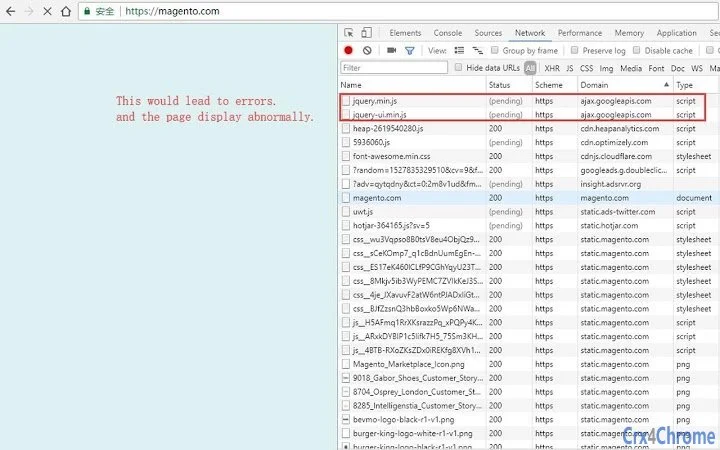
The software is designed to address connectivity challenges in regions where access to Google’s services—specifically ajax.googleapis.com and fonts.googleapis.com—is restricted. These domains serve critical resources such as JavaScript libraries and web fonts, commonly used by websites and content management systems like WordPress. When these services are unreachable, web pages may display incorrectly, load slowly, or fail to function entirely.
This tool aims to resolve such issues by transparently redirecting requests to alternative mirror sources that remain accessible. It is particularly useful for developers, designers, and site administrators who rely on Google-hosted assets but operate in environments with limited or blocked access to Google’s infrastructure. The solution supports multiple operating systems, ensuring broad usability across Windows, Mac, and Linux platforms.
While the developer has not provided detailed background information, the tool’s functionality is focused on maintaining website integrity and usability under network restrictions. Its primary use case involves troubleshooting and restoring functionality for web applications that depend on external Google resources.
Key Features & Capabilities
- Automatic Request Redirection – The extension monitors outgoing requests to
ajax.googleapis.comandfonts.googleapis.com, identifying those that fail due to network restrictions and automatically rerouting them to verified mirror domains. - Seamless Integration – No configuration is required for most users. The tool operates in the background, ensuring that websites continue to function as intended without manual intervention.
- Support for Common Web Assets – It specifically targets widely used resources such as jQuery, Bootstrap, Google Fonts, and other JavaScript libraries hosted on Google’s CDN.
- Cross-Platform Compatibility – Works across Windows, Mac, and Linux systems, providing consistent behavior regardless of the underlying operating environment.
- Non-Intrusive Operation – The extension does not alter website code or require modifications to existing projects. It functions entirely at the browser level.
For example, when a user visits a WordPress site that relies on Google Fonts, and the original request to fonts.googleapis.com fails, the extension intercepts the request and redirects it to a working mirror. This restores proper font rendering without requiring changes to the site’s source code. Similarly, if a JavaScript library fails to load due to blocked access to ajax.googleapis.com, the extension ensures the resource is fetched from an alternative source, preserving full site functionality.
User Interface, Workflow & Performance
The user interface is minimal and designed for transparency. It does not include a visible dashboard or settings panel, which suggests a focus on simplicity and unobtrusiveness. Navigation is limited to standard browser extension management pages, where users can enable, disable, or remove the tool.
The workflow is fully automated: once installed and activated, the extension begins monitoring network requests immediately. No user input is required during normal operation. Performance observations are based on general software behavior patterns.
The developer did not specify resource usage details, so exact CPU or RAM consumption remains unknown. However, given the nature of the tool—handling network request redirection—it is expected to have low overhead under typical conditions. Stability appears to be a priority, as the tool operates without altering website content or injecting scripts.
There are no reported issues with browser crashes or conflicts with other extensions, though this is based on general expectations rather than verified data.
Compatibility & System Requirements
The software is compatible with Windows, Mac, and Linux operating systems. It is designed to function as a browser extension, supporting modern web browsers available on these platforms. The installation size is 2.4 MB, indicating a lightweight footprint.
The software version is 1.0, released on April 5, 2025. Exact system requirements were not listed. Compatibility information was partially provided, with no mention of specific browser versions or hardware specifications.
The developer did not provide additional system requirements. Users should ensure their browser supports extensions and has JavaScript enabled to use the tool effectively. No additional dependencies were specified.
Pros and Cons
Pros
- Resolves website display issues caused by blocked Google services
- Automatically handles redirection without user intervention
- Lightweight at 2.4 MB with minimal system impact
- Supports multiple operating systems: Windows, Mac, Linux
- Does not require changes to website code or configuration
Cons
- No visible interface or configuration options for advanced users
- Exact performance and resource usage details not specified
- Dependent on the availability and reliability of mirror sources
- No update notifications or changelog provided
- Developer background not disclosed
FAQ Section
Is this tool compatible with all browsers?
The software is designed for browsers that support extensions on Windows, Mac, and Linux. Specific browser compatibility was not detailed by the developer.
Is the extension safe to use?
Yes, the extension operates at the network level and does not modify website content or inject malicious code. It only redirects requests to alternative mirror domains.
Does the extension require updates?
Updates are likely necessary to maintain compatibility with new mirror sources and changing network conditions. However, no automatic update mechanism or release history was specified.
Can I use this tool offline?
The extension requires an active internet connection to redirect requests to mirror servers. It cannot function in completely offline environments.
What license type does this tool use?
The software is free to use and distributed without cost. No license details were provided by the developer.
Final Thoughts
This tool offers a practical solution for users operating in regions with restricted access to Google’s public services. By automatically redirecting critical web resources to accessible mirrors, it restores functionality to websites and applications that otherwise would fail to load properly. Its lightweight design, cross-platform support, and zero-configuration setup make it ideal for developers, site administrators, and content creators who need reliable access to Google-hosted assets.
While the lack of a visible interface and detailed documentation may limit its appeal to advanced users, its simplicity is also its strength. For those facing persistent loading failures due to blocked Google APIs and fonts, this extension provides a reliable, no-frills fix. It fills a critical gap in web accessibility under network restrictions.
Download Fix Google API & Fonts Access in Restricted Networks now.







